2026 AI & Machine Learning

WWDC26 · 14 min · AI & Machine Learning
Create high-quality images using Image Playground
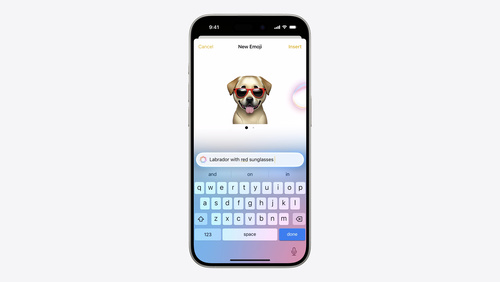
Enable high-quality image creation in your app using Image Playground. With a new generative model that runs on Private Cloud Compute, users can make images in virtually any style, including photorealistic, in your app. You can also specify dimensions for use in even more places, and allow people to modify images using natural language descriptions and touch. Explore how to adopt Image Playground, generate images from descriptions and photos, and manage feature availability in your app.
Watch at developer.apple.com ↗Chapters
Code shown on screen · 12 snippets
Adopt Image Playground in SwiftUI
// Adopt Image Playground in SwiftUI

func imagePlaygroundSheet(
    isPresented: Binding<Bool>,
    concepts: [ImagePlaygroundConcept] = [],
    sourceImage: Image? = nil,
    onCompletion: @escaping (URL) -> Void,
    onCancellation: (() -> Void)? = nil
) -> some View
Add Image Playground sheet with binding to @State
// Adopt Image Playground
private var showingPlayground = false
var body: some View {
Button("Create image") {
showingPlayground = true
}
.imagePlaygroundSheet(
isPresented: $showingPlayground,
onCompletion: { url in
var updated = currentCard
store.saveImage(url, for: &updated)
}
)
}Seeding the sheet with context from your card
// Seeding the sheet with context from your card

var concepts: [ImagePlaygroundConcept] {
    [
        .text(card.theme),
        .extracted(from: card.message, title: card.theme),
    ]
}

var body: some View {
    Button("Create image") {
        showingPlayground = true
    }
    .imagePlaygroundSheet(
        isPresented: $showingPlayground,
        concepts: concepts,
        onCompletion: { url in
            var updated = card
            store.saveImage(url, for: &updated)
        }
    )
}
Starting from a reference photo
// Starting from a reference photo
private var sourceImage: Image?
var body: some View {
Button("Create image") {
showingPlayground = true
}
.imagePlaygroundSheet(
isPresented: $showingPlayground,
concepts: concepts,
sourceImage: sourceImage,
onCompletion: { url in
var updated = card
store.saveImage(url, for: &updated)
}
)
}Providing a visual suggestion using a drawing
// Providing a visual suggestion using a drawing
private var drawing = PKDrawing()
var concepts: [ImagePlaygroundConcept] {
var result: [ImagePlaygroundConcept] = [
.text(card.theme),
.extracted(from: card.message)
]
if !drawing.strokes.isEmpty {
result.append(.drawing(drawing))
}
return result
}Adopt Image Playground in UIKit or AppKit
// Adopt Image Playground in UIKit or AppKit

func presentViewController() {
    let viewController = ImagePlaygroundViewController()
    viewController.concepts = [
        .text(card.theme),
        .extracted(from: card.message)
    ]
    viewController.delegate = self
    present(viewController, animated: true)
}

func imagePlaygroundViewController(
    _ viewController: ImagePlaygroundViewController,
    didCreateImageAt url: URL
) {
    var updated = card
    store.saveImage(url, for: &updated)
    dismiss(animated: true)
}
Size Specification
// Size Specification

var options: ImagePlaygroundOptions {
    var options = ImagePlaygroundOptions()
    options.sizeSpecification = .closest(to: card.format.size)
    return options
}

var body: some View {
    Button("Create image") { showingPlayground = true }
        .imagePlaygroundSheet(
            isPresented: $showingPlayground,
            concepts: concepts,
            onCompletion: { url in
                var updated = card
                store.saveImage(url, for: &updated)
            }
        )
        .imagePlaygroundOptions(options)
}
Styles
// Styles

var options: ImagePlaygroundOptions {
    var options = ImagePlaygroundOptions()
    options.sizeSpecification = .closest(to: card.format.size)
    return options
}

var body: some View {
    Button("Create image") { showingPlayground = true }
        .imagePlaygroundSheet(
            isPresented: $showingPlayground,
            concepts: concepts,
            onCompletion: { url in
                var updated = card
                store.saveImage(url, for: &updated)
            }
        )
        .imagePlaygroundOptions(options)
        .imagePlaygroundGenerationStyle(
            pendingStylePreset.defaultStyle,
            in: pendingStylePreset.allowedStyles
        )
}
External Provider Style
// External Provider Style

var options: ImagePlaygroundOptions {
    var options = ImagePlaygroundOptions()
    options.sizeSpecification = .closest(to: card.format.size)
    return options
}

var body: some View {
    Button("Create image") { showingPlayground = true }
        .imagePlaygroundSheet(
            isPresented: $showingPlayground,
            concepts: concepts,
            onCompletion: { url in
                var updated = card
                store.saveImage(url, for: &updated)
            }
        )
        .imagePlaygroundOptions(options)
        .imagePlaygroundGenerationStyle(
            pendingStylePreset.defaultStyle,
            in: pendingStylePreset.allowedStyles + [.externalProvider]
        )
}
Generating an expressive icon for the card thumbnail
// Generating an expressive icon for the card thumbnail
private var showingIconPlayground = false
var body: some View {
Button("Create icon") {
showingIconPlayground = true
}
Color.clear
.imagePlaygroundSheet(
isPresented: $showingIconPlayground,
concepts: concepts,
onCompletion: { _ in
} ,
onAdaptiveImageGlyphCreation: { glyph in
var updatedCard = card
store.saveIcon(glyph, for: &updatedCard)
}
)
.imagePlaygroundGenerationStyle(.emoji, in: [.emoji])
}Disabling personalization when it doesn't fit your context
// Disabling personalization when it doesn't fit your context

var options: ImagePlaygroundOptions {
    var options = ImagePlaygroundOptions()
    options.sizeSpecification = .closest(to: card.format.size)
    options.personalization = .disabled
    return options
}
Supports image generation
// Supports image generation
(\.supportsImageGeneration)
private var supportsImageGeneration
var body: some View {
NavigationLink(card.recipient) {
if supportsImageGeneration {
CardEditorView(card: card)
}γelse {
CardPickerView(card: card)
}
}
}Related sessions
-
 11 min
 -
 15 min
 -
 11 min