2025 DesignSwiftUI & UI Frameworks
WWDC25 · 26 min · Design / SwiftUI & UI Frameworks
Build a UIKit app with the new design
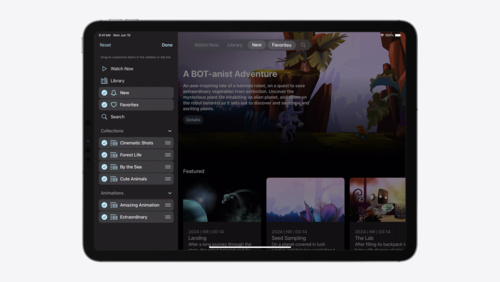
Update your UIKit app to take full advantage of the new design system. We’ll dive into key changes to tab views, split views, bars, presentations, search, and controls, and show you how to use Liquid Glass in your custom UI. To get the most out of this video, we recommend first watching “Get to know the new design system” for general design guidance.
Watch at developer.apple.com ↗Chapters
Code shown on screen · 38 snippets
Minimize tab bar on scroll
// Minimize tab bar on scroll

tabBarController.tabBarMinimizeBehavior = .onScrollDown
Add a bottom accessory
// Add a bottom accessory

let nowPlayingView = NowPlayingView()
let accessory = UITabAccessory(contentView: nowPlayingView)
tabBarController.bottomAccessory = accessory
Update the accessory with the tabAccessoryEnvironment trait
// Update the accessory with the trait

registerForTraitChanges([UITraitTabAccessoryEnvironment.self]) { (view: MiniPlayerView, _) in
    let isInline = view.traitCollection.tabAccessoryEnvironment == .inline
    view.updatePlayerAppearance(inline: isInline)
}

// Automatic trait tracking with updateProperties()
override func updateProperties() {
    super.updateProperties()
    let isInline = traitCollection.tabAccessoryEnvironment == .inline
    updatePlayerAppearance(inline: isInline)
}
Extend content under the sidebar
// Extend content underneath the sidebar

let posterImageView = UIImageView(image: ...)

let extensionView = UIBackgroundExtensionView()
extensionView.contentView = posterImageView
view.addSubview(extensionView)

let detailsView = ShowDetailsView()
view.addSubview(detailsView)
Adjust the effect layout
// Adjust the effect layout

let posterImageView = UIImageView(image: ...)

let extensionView = UIBackgroundExtensionView()
extensionView.contentView = posterImageView
extensionView.automaticallyPlacesContentView = false
view.addSubview(extensionView)

posterImageView.translatesAutoresizingMaskIntoConstraints = false
NSLayoutConstraint.activate([
    posterImageView.topAnchor.constraint(equalTo: extensionView.topAnchor),
    posterImageView.leadingAnchor.constraint(equalTo: extensionView.safeAreaLayoutGuide.leadingAnchor),
    posterImageView.trailingAnchor.constraint(equalTo: extensionView.safeAreaLayoutGuide.trailingAnchor),
    posterImageView.bottomAnchor.constraint(equalTo: extensionView.safeAreaLayoutGuide.bottomAnchor),
])
Custom grouping
// Custom grouping

navigationItem.rightBarButtonItems = [
    doneButton,
    flagButton,
    folderButton,
    infoButton,
    .fixedSpace(0),
    shareButton,
    selectButton
]
UIBarButtonItem tint color and style
// Tint color and style

let flagButton = UIBarButtonItem(image: UIImage(systemName: "flag.fill"))
flagButton.tintColor = .systemOrange
flagButton.style = .prominent
Toolbar with evenly distributed items in a single background
// Toolbar with evenly distributed items, grouped in a single background.

let flexibleSpace = UIBarButtonItem.flexibleSpace()
flexibleSpace.hidesSharedBackground = false

toolbarItems = [
   .init(image: UIImage(systemName: "location")),
   flexibleSpace,
   .init(image: UIImage(systemName: "number")),
   flexibleSpace,
   .init(image: UIImage(systemName: "camera")),
   flexibleSpace,
   .init(image: UIImage(systemName: "trash")),
]
Titles and subtitles
// Titles and subtitles

navigationItem.title = "Inbox"
navigationItem.subtitle = "49 Unread"
Large subtitle view
// Titles and subtitles

navigationItem.title = "Inbox"
navigationItem.largeSubtitleView = filterButton
Edge effect for a custom container
// Edge effect’s custom container

let interaction = UIScrollEdgeElementContainerInteraction()
interaction.scrollView = contentScrollView
interaction.edge = .bottom

buttonsContainerView.addInteraction(interaction)
Hard edge effect style
// Hard edge effect style

scrollView.topEdgeEffect.style = .hard
Morph popover from its source button
// Morph popover from its source button

viewController.popoverPresentationController?.sourceItem = barButtonItem
Morph sheet from bar button
// Morph sheet from bar button

viewController.preferredTransition = .zoom { _ in
     folderBarButtonItem
}
Source item for action sheets
// Setting source item for action sheets

alertController.popoverPresentationController?.sourceItem = barButtonItem
Placing search in the toolbar
// Place search bar in a toolbar

toolbarItems = [
    navigationItem.searchBarPlacementBarButtonItem,
    .flexibleSpace(),
    addButton
]
Universally accessible search on iPad
// Place search at the trailing edge of the navigation bar

navigationItem.searchBarPlacementAllowsExternalIntegration = true
Activate the search field when search bar is tapped
// Activate the search field when search bar is tapped

searchTab.automaticallyActivatesSearch = true
Search as a dedicated view
// Search as a dedicated view

navigationItem.preferredSearchBarPlacement = .integratedCentered
Buttons
// Standard glass
button.configuration = .glass()

// Prominent glass
tintedButton.configuration = .prominentGlass()
Neutral slider with 5 ticks and a neutral value
// Neutral slider with 5 ticks and a neutral value
slider.trackConfiguration = .init(allowsTickValuesOnly: true,
                                  neutralValue: 0.2,
                                  numberOfTicks: 5)
Thumbless slider
// Thumbless slider
slider.sliderStyle = .thumbless
Glass for custom views
// Adopting glass for custom views

let effectView = UIVisualEffectView()
addSubview(effectView)

let glassEffect = UIGlassEffect()
// Animating setting the effect results in a materialize animation
UIView.animate {
    effectView.effect = glassEffect
}
Custom corner configuration
// Custom corner configuration

UIView.animate {
    effectView.cornerConfiguration = .fixed(8)
}
Dark mode
// Adapting to dark mode

UIView.animate {
    view.overrideUserInterfaceStyle = .dark
}
Adding glass to an existing glass container
// Adding glass to an existing glass container

let container = UIVisualEffectView()
container.effect = UIGlassEffect()

container.contentView.addSubview(effectView)
Container relative corners
// Container relative corners

UIView.animate {
    effectView.cornerConfiguration = .containerRelative()
    effectView.frame.origin = CGPoint(x: 10, y: 10)
}
Container relative corners, animated
// Container relative corners

UIView.animate {
    effectView.frame.origin = CGPoint(x: 30, y: 30)
}
Glass adapts based on its size
// Glass adapts based on its size

UIView.animate {
    view.overrideUserInterfaceStyle = .light
    effectView.bounds.size = CGSize(width: 250, height: 88)
}

UIView.animate {
    effectView.bounds.size = CGSize(width: 150, height: 44)
}
Adding content to glass views
// Adding content to glass views

let label = UILabel()
label.text = "WWDC25"
label.textColor = .secondaryLabel

effectView.contentView.addSubview(label)
Applying tint color to glass
// Applying tint color to glass

let glassEffect = UIGlassEffect()
glassEffect.tintColor = .systemBlue

UIView.animate {
    effectView.effect = glassEffect
    label.textColor = .label
}
Using custom colors with glass
// Using custom colors with glass

let glassEffect = UIGlassEffect()
glassEffect.tintColor = UIColor(displayP3Red: r,
                                green: g,
                                blue: b,
                                alpha: 1)

UIView.animate {
    effectView.effect = glassEffect
    // Animate out the label
    label.alpha = 0
}
Enabling interactive glass behavior
// Enabling interactive glass behavior

let glassEffect = UIGlassEffect()
glassEffect.isInteractive = true

effectView.effect = glassEffect
Animating glass out using dematerialize animation
// Animating glass out using dematerialize animation

UIView.animate {
    effectView.effect = nil
}
Adding glass elements to a container
// Adding glass elements to a container

let container = UIGlassContainerEffect()
let containerView = UIVisualEffectView(effect: container)

let glassEffect = UIGlassEffect()
let view1 = UIVisualEffectView(effect: glassEffect)
let view2 = UIVisualEffectView(effect: glassEffect)

containerEffectView.contentView.addSubview(view1)
containerEffectView.contentView.addSubview(view2)
Adjusting the container spacing
// Adjusting the container spacing

let containerEffect = UIGlassContainerEffect()
containerEffect.spacing = 20
containerEffectView.effect = containerEffect
Merging two glass views
// Merging two glass views

UIView.animate {
    view1.frame = finalFrame
    view2.frame = finalFrame
}
Dividing glass into multiple views
// Dividing glass into multiple views

UIView.performWithoutAnimation {
    for view in finalViews {
        containerEffectView.contentView.addSubview(view)
        view.frame = startFrame
    }
}

UIView.animate {
    for view in finalViews {
        view.frame = finalFrame(for: view)
    }
}
Resources
Related sessions
-
 20 min
 -
 18 min
 -
 26 min
 -
 17 min
 -
 16 min
 -
 14 min