2020 Developer ToolsGraphics & Games
WWDC20 · 36 min · Developer Tools / Graphics & Games
Build GPU binaries with Metal
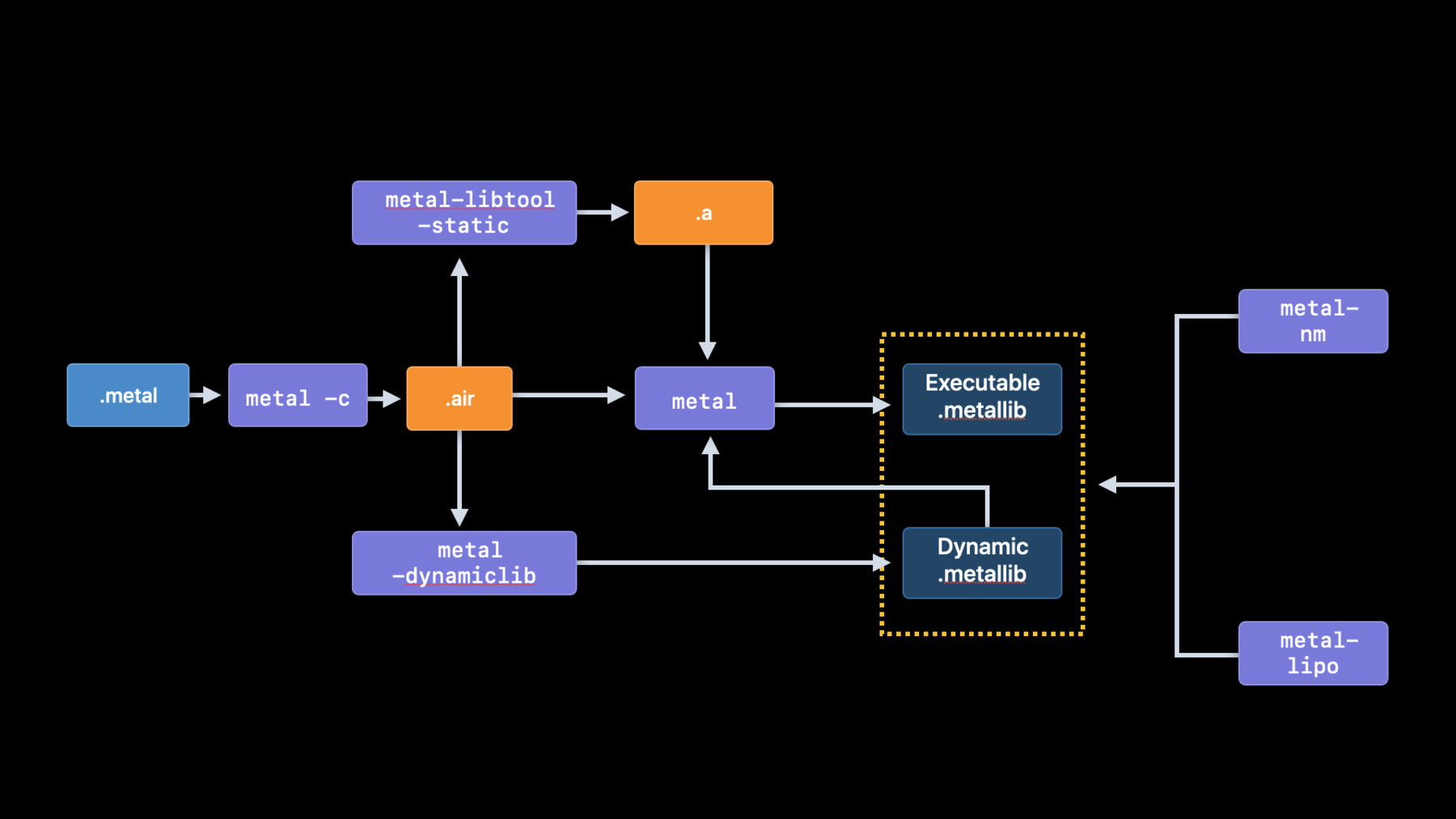
Power up your shader pipeline with enhancements to the Metal shader compilation model — all leading to a dramatic reduction in Pipeline State Object (PSO) loading time, especially upon first launch. Learn about explicit PSO caching and sharing of GPU binaries using Metal binary archives and dynamic libraries. And we’ll detail the toolchain to create libraries and improve your shader compilation workflow.
Watch at developer.apple.com ↗Code shown on screen · 7 snippets
Creating an empty archive
let descriptor = MTLBinaryArchiveDescriptor()
descriptor.url = nil
let binaryArchive = try device.makeBinaryArchive(descriptor:descriptor)
Populating an archive
// Render pipelines
try binaryArchive.addRenderPipelineFunctions(with: renderPipelineDescriptor)

// Compute pipelines
try binaryArchive.addComputePipelineFunctions(with: computePipelineDescriptor)

// Tile render pipelines
try binaryArchive.addTileRenderPipelineFunctions(with: tileRenderPipelineDescriptor)
Reusing compiled functions
// Reusing compiled functions to build a pipeline state object from a file

let renderPipelineDescriptor = MTLRenderPipelineDescriptor()
// ...
renderPipelineDescriptor.binaryArchives = [ binaryArchive ]

let renderPipeline = try device.makeRenderPipelineState(descriptor:
                                                          renderPipelineDescriptor)
Serialization
let documentsURL = FileManager.default.urls(for: .documentDirectory, in: .userDomainMask).first!
let archiveURL = documentsURL.appendingPathComponent("binaryArchive.metallib")

try binaryArchive.serialize(to: NSURL.fileURL(withPath: archiveURL))
Deserialization
let documentsURL = FileManager.default.urls(for: .documentDirectory, in: .userDomainMask).first!
let serializeURL = documentsURL.appendingPathComponent("binaryArchive.metallib")

let descriptor = MTLBinaryArchiveDescriptor()
descriptor.url = NSURL.fileURL(withPath: serializeURL)
let binaryArchive = try device.makeBinaryArchive(descriptor: descriptor)
Runtime compiled dynamic library
let options = MTLCompileOptions();
options.libraryType = .dynamic;
options.installName = "@executable_path/myDynamicLibrary.metallib"
let utilityLib = try device.makeLibrary(source: dylibSrc, options: options)
let utilityDylib = try device.makeDynamicLibrary(library: utilityLib)
Compiling with a dynamic library
let options = MTLCompileOptions()
options.libraries = [ utilityDylib ]
let library = try device.makeLibrary(source: kernelStr, options: options)
Resources
Related sessions
-
 19 min
 -
 14 min
 -
 25 min
 -
 21 min
 -
 34 min
 -
 45 min