2020 SwiftSwiftUI & UI Frameworks
WWDC20 · 15 min · Swift / SwiftUI & UI Frameworks
App essentials in SwiftUI
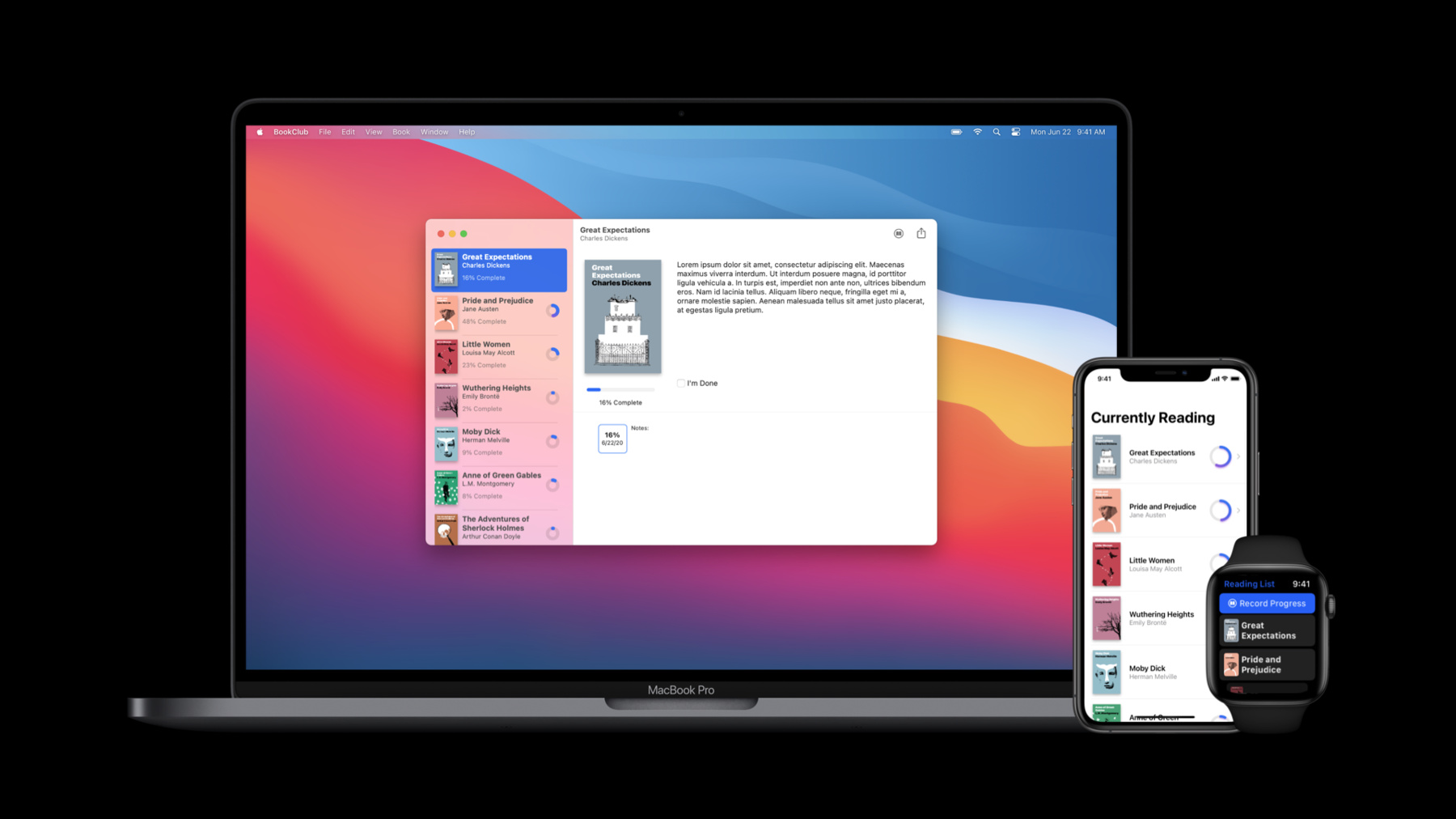
Thanks to the new App protocol, SwiftUI now supports building entire apps! See how Apps, Scenes, and Views fit together. Learn how easy it is to implement the features people expect from a best-in-class product while saving time and reducing complexity. Easily add expected functionality to your interface using the new commands modifier, and explore the ins and outs of the new WindowGroup API. To get the most out of this session, you should have some experience with SwiftUI. Watch “Introduction to SwiftUI” for a primer. Want more SwiftUI? Take your pick: “What’s new in SwiftUI”, “Data essentials in Swift UI ”, "Stacks, grids, and outlines in SwiftUI", and “Build document-based apps in SwiftUI”.
Watch at developer.apple.com ↗Code shown on screen · 6 snippets
Book club app
@main
struct BookClubApp: App {
private var store = ReadingListStore()
var body: some Scene {
WindowGroup {
ReadingListViewer(store: store)
}
}
}
struct ReadingListViewer: View {
var store: ReadingListStore
var body: some View {
NavigationView {
List(store.books) { book in
Text(book.title)
}
.navigationTitle("Currently Reading")
}
}
}
class ReadingListStore: ObservableObject {
init() {}
var books = [
Book(title: "Book #1", author: "Author #1"),
Book(title: "Book #2", author: "Author #2"),
Book(title: "Book #3", author: "Author #3")
]
}
struct Book: Identifiable {
let id = UUID()
let title: String
let author: String
}Window groups
@main
struct BookClubApp: App {
private var store = ReadingListStore()
var body: some Scene {
WindowGroup {
ReadingListViewer(store: store)
}
}
}
struct ReadingListViewer: View {
var store: ReadingListStore
var body: some View {
NavigationView {
List(store.books) { book in
Text(book.title)
}
.navigationTitle("Currently Reading")
}
}
}
class ReadingListStore: ObservableObject {
init() {}
var books = [
Book(title: "Book #1", author: "Author #1"),
Book(title: "Book #2", author: "Author #2"),
Book(title: "Book #3", author: "Author #3")
]
}
struct Book: Identifiable {
let id = UUID()
let title: String
let author: String
}Scene storage
@main
struct BookClubApp: App {
private var store = ReadingListStore()
var body: some Scene {
WindowGroup {
ReadingListViewer(store: store)
}
}
}
struct ReadingListViewer: View {
var store: ReadingListStore
("selectedItem") private var selectedItem: String?
var selectedID: Binding<UUID?> {
Binding<UUID?>(
get: { selectedItem.flatMap { UUID(uuidString: $0) } },
set: { selectedItem = $0?.uuidString }
)
}
var body: some View {
NavigationView {
List(store.books) { book in
NavigationLink(
destination: Text(book.title),
tag: book.id,
selection: selectedID
) {
Text(book.title)
}
}
.navigationTitle("Currently Reading")
}
}
}
class ReadingListStore: ObservableObject {
init() {}
var books = [
Book(title: "Book #1", author: "Author #1"),
Book(title: "Book #2", author: "Author #2"),
Book(title: "Book #3", author: "Author #3")
]
}
struct Book: Identifiable {
let id = UUID()
let title: String
let author: String
}Document groups
import SwiftUI
import UniformTypeIdentifiers
@main
struct ShapeEditApp: App {
var body: some Scene {
DocumentGroup(newDocument: ShapeDocument()) { file in
DocumentView(document: file.$document)
}
}
}
struct DocumentView: View {
var document: ShapeDocument
var body: some View {
Text(document.title)
.frame(width: 300, height: 200)
}
}
struct ShapeDocument: Codable {
var title: String = "Untitled"
}
extension UTType {
static let shapeEditDocument =
UTType(exportedAs: "com.example.ShapeEdit.shapes")
}
extension ShapeDocument: FileDocument {
static var readableContentTypes: [UTType] { [.shapeEditDocument] }
init(fileWrapper: FileWrapper, contentType: UTType) throws {
let data = fileWrapper.regularFileContents!
self = try JSONDecoder().decode(Self.self, from: data)
}
func write(to fileWrapper: inout FileWrapper, contentType: UTType) throws {
let data = try JSONEncoder().encode(self)
fileWrapper = FileWrapper(regularFileWithContents: data)
}
}Settings scene
@main
struct BookClubApp: App {
private var store = ReadingListStore()
var body: some Scene {
WindowGroup {
ReadingListViewer(store: store)
}
#if os(macOS)
Settings {
BookClubSettingsView()
}
#endif
}
}
struct BookClubSettingsView: View {
var body: some View {
Text("Add your settings UI here.")
.padding()
}
}
struct ReadingListViewer: View {
var store: ReadingListStore
var body: some View {
NavigationView {
List(store.books) { book in
Text(book.title)
}
.navigationTitle("Currently Reading")
}
}
}
class ReadingListStore: ObservableObject {
init() {}
var books = [
Book2(title: "Book #1", author: "Author #1"),
Book2(title: "Book #2", author: "Author #2"),
Book2(title: "Book #3", author: "Author #3")
]
}
struct Book: Identifiable {
let id = UUID()
let title: String
let author: String
}BookCommands
struct BookCommands: Commands {
(\.selectedBook) private var selectedBook: Book?
var body: some Commands {
CommandMenu("Book") {
Section {
Button("Update Progress...", action: updateProgress)
.keyboardShortcut("u")
Button("Mark Completed", action: markCompleted)
.keyboardShortcut("C")
}
.disabled(selectedBook == nil)
}
}
private func updateProgress() {
selectedBook?.updateProgress()
}
private func markCompleted() {
selectedBook?.markCompleted()
}
}Resources
Related sessions
-
 19 min
 -
 12 min
 -
 36 min
 -
 28 min
 -
 55 min
 -
 34 min
 -
 21 min